This guide contains all content and hyperlinks from the presentation “Sabbatical Updates” offered August 19, 2026 by the Office for Academic Personnel and Faculty. It is intended to help administrators manage sabbatical applications efficiently and ensure compliance with Academic Personnel Faculty (APF) procedures.
Important Dates
Please note the following deadlines for the 2026 sabbatical review cycle:
- September 1: Notification of quarter allocation
- September 1: Sabbatical case initiation opens
- February 1: Sabbatical case initiation closes and cases are due to APF
- By March 15: Decisions will be announced via email and available on APF’s Case Maintenance website
Administrators should plan departmental timelines to ensure all materials are completed and submitted well before the February 1 deadline.
Case Maintenance Changes
Several updates have been made to the Case Maintenance system.
Quarters Requested
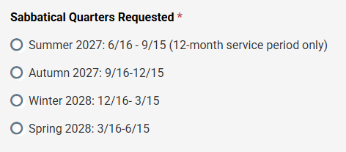
The number of quarters requested is no longer collected during case initiation. Instead, this information will be gathered exclusively through the candidate’s application form.
Candidate Contact Information
Candidate NetID and email information have been added to the case cover sheet.
Cover Sheet Editing
When changes are made to the cover sheet, the system will automatically generate a new version and attach it to the case.
To Edit a Cover Sheet
- Navigate to the Case Maintenance page.
- Locate the appropriate case.
- Select Details.
- Click Edit.
- Make the necessary changes.
- Click Save.
A revised cover sheet will be added to the case within approximately two hours. Administrators may continue making edits until the case is forwarded to APF.
RPT and Application Changes
Candidate Application Updates
The sabbatical application form has been revised for the new review cycle.
Sabbatical Abstract
The section previously called Sabbatical Plan has been renamed Sabbatical Abstract.

Key requirements:
- Maximum of 150 words.
- Candidates must still submit the complete sabbatical plan as part of the application package.
- The full plan does not need to be reproduced in its entirety within the application form itself.
Template and Form Changes
Template Updates
The primary template change is an updated link to the librarian contract. Because this is the only template modification:
- Non-librarian units generally do not need to re-duplicate templates.
- Re-duplication is only necessary if department-level changes have been made.
Form Updates
Several administrative form revisions have been implemented:
- Updates related to statutory limits.
- Minor language revisions throughout forms.
- Administrative duties have been added to the list of activities that chairs and deans may need to address when evaluating an applicant’s sabbatical plan.
- Questions regarding outside work on SCC Leader forms have been streamlined and consolidated.

Process Overview
Review Templates Before Opening Cases
All units should review their sabbatical templates before initiating any cases. Particular attention should be given to:
- Committee requirements
- Unit-level requirements
- Local review procedures
SCC Template Requirements
Departments must re-duplicate their SCC template whenever the SCC makes revisions.
Required Naming Convention
Use the following format:
SCC_DEPT_DEP/UNDEP Sabbatical Template
Example:
CAS_ENG_DEP Sabbatical Template
Initiating Cases
Cases should be initiated through the APF Case Maintenance website. Once a case is created:
- Notify the candidate that the case has been initiated.
- Conduct all required departmental reviews.
- Forward the case to APF by the deadline.
Saving Materials
Departments should download any case materials they wish to retain before forwarding a case to APF.
Important: APF will not retain email correspondence or related communications associated with the case.
Sabbatical Reports
When faculty members return from sabbatical, final sabbatical reports should be submitted to acadpers@uw.edu.
Managing Changes After Submission
Changes to Candidate Applications
If a candidate needs to modify application information, such as requested quarters:
- Unlock the candidate section so the faculty member can update the application.
- This can be done until the case is transferred to APF.
Quarter Changes After APF Review Begins
If changes to the number of approved quarters occur after the case has moved to APF:
- Email acadpers@uw.edu
- Use the subject line: Sabbatical Change
Candidate Withdrawals
If a candidate withdraws from consideration:
- Email acadpers@uw.edu
- Use the subject line: Sabbatical Withdrawal
- APF will process the withdrawal.
Communication Guidance
- Do not copy additional APF staff on routine sabbatical emails.
- Avoid using Teams for standard sabbatical questions.
- Use acadpers@uw.edu unless there is an emergency requiring an immediate response.
Website Enhancements
Several new online resources are available to support sabbatical administrators.
New Landing Page
A new landing page provides:
- Key due dates
- Getting-started resources
- Important sabbatical process links
New Overview Resources
Additional website enhancements include:
- A dedicated overview page
- Getting Started guidance
- Annual Template Updates information
- Step-by-step case review instructions for each template type
- Better alignment with Promotion & Tenure processes and resources
Key Takeaways
- Review and update departmental templates before opening cases.
- Case initiation opens September 1 and closes February 1.
- Requested quarters are now collected only through the candidate application.
- The Sabbatical Plan section has been replaced with a 150-word Sabbatical Abstract.
- Download any records you wish to keep before forwarding cases to APF.
- Send all sabbatical-related updates, withdrawals, and reports to acadpers@uw.edu.
- Take advantage of the new sabbatical website resources and guidance pages.