Welcome to the new Promotion and Tenure (P&T) cycle! Case initiation for the 2026–2027 cycle is now open.
Getting Started
Case initiation is available on the Case Maintenance page. After completing any unit template updates, initiate your new cases through this page. Cases will appear in Interfolio RPT within two hours. This streamlined process includes Workday data with each case and eliminates the need to manually enter appointment data.
Important Reminders for 2026-2027
New standing committees may be required. If a standing committee’s membership is changing from the 2025–26 cycle, you must create a new committee. Any changes to an existing committee will update all associated cases, including 2025–26 cases. Update your template to ensure all cases are created with the correct committees.
Remember to use the Replace functionality for committees to retain step instructions and requirements.
Candidates must be notified when their cases are ready. Steps with form requirements must have a Committee Manager assigned to complete the form.
Recent Updates
Closing cases. If a case must be closed due to an error or candidate withdrawal, use the existing reason codes Error or Candidate Withdrew, respectively. Please do not create new reason codes, as we want to track closed cases for reporting purposes. If a case is closed due to the candidate’s withdrawal, please also email acadpers@uw.edu to notify our office.
External Reviewer Grid updates. In response to formatting feedback, the following updates have been made to the template on our website:
- Removed two columns used to track reminder email dates
- Combined the name fields into a single column (Last, First)
- Reordered columns to reflect content importance
- Updated formatting to narrow margins, landscape orientation, and fit-to-one-page layout
We hope these changes improve both usability and readability.
External Reviewer Nominees form. Based on feedback regarding issues with the required External Reviewer Nominees form, APF has approved removing this requirement from your template. Nominees provided by the candidate should still appear on the External Reviewer Nominee grid, but names may be collected outside of RPT. You may also share the grid directly with candidates to reduce duplicate work.
To remove the form from your template:
1. Navigate to your template.
2. From the Template Summary page, select Candidate Requirements on the right.
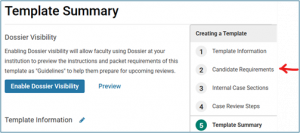
3. From the Candidate Requirements page, scroll down to Packet Requirements.
4. Locate the External Reviewer Nominees form and remove it from your template by clicking the X. Do not remove any other requirements.

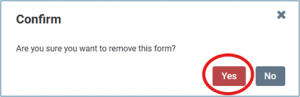
5. Confirm the removal.
Questions?
Please submit inquiries to acadpers@uw.edu.