This guide provides a concise reference for preparing Interfolio templates, managing committees, and avoiding common issues during the 2027-2028 Promotion & Tenure cycle.
Key Updates for 2027-2028
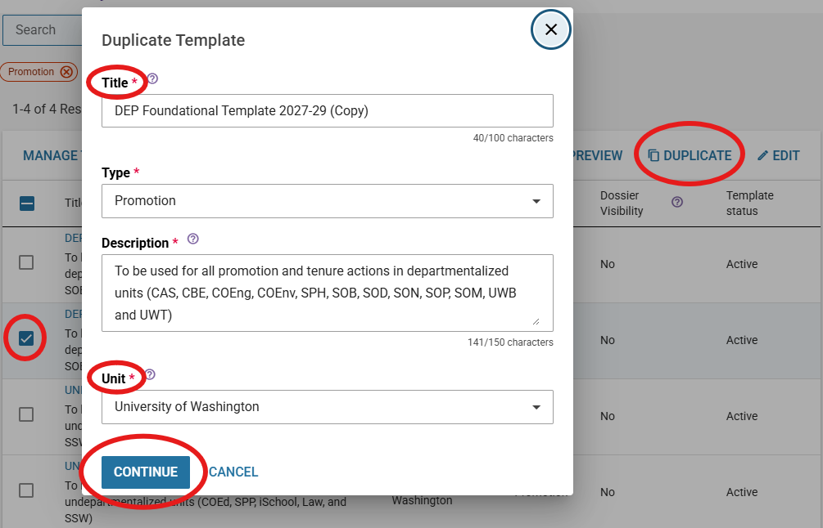
- All SCCs must duplicate the APF foundational template (DEP or UNDEP) for the new cycle.
- SCCs should direct departments to use or duplicate the SCC template as appropriate.
- The Candidate External Nominee Form has been removed from Candidate Materials.
- Units may still choose to use the form if desired.
- The SCC Summary Form has been renamed the SCC Summary Report and is now required.
- Cover sheets and data sheets can now be edited by administrators until a case is moved to APF.
Template Naming Convention
Use the following format when duplicating templates:
SCC_DEPT_Template Type
Examples:
- ENG_CEE_DEP Template 2027-28
- LAW_UNDEP Template 2027-28
Follow this naming convention consistently to support accurate case management and reporting.
Template Duplication Workflow
SCC Responsibilities
- Duplicate APF foundational template (DEP or UNDEP).
- Review template content.
- Add SCC-specific requirements.
- Replace SCC-level committees.
- Share the template with departments.
Department Responsibilities
- Duplicate the SCC template (if applicable).
- Review template content.
- Add department-specific requirements.
- Replace department committees.
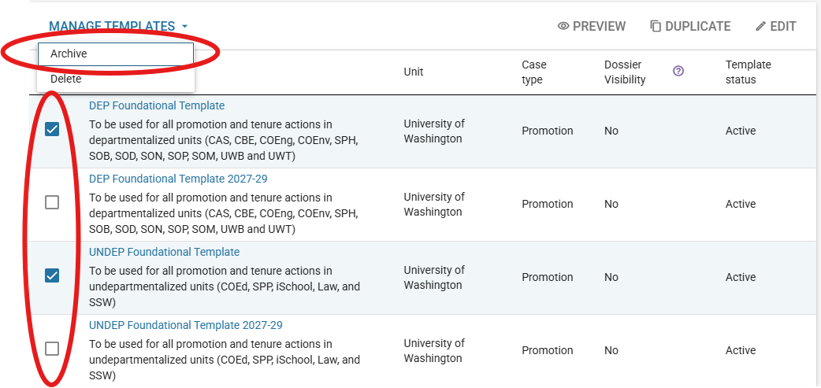
- Archive old templates.
Committee Setup Checklist
Replace, Don’t Add
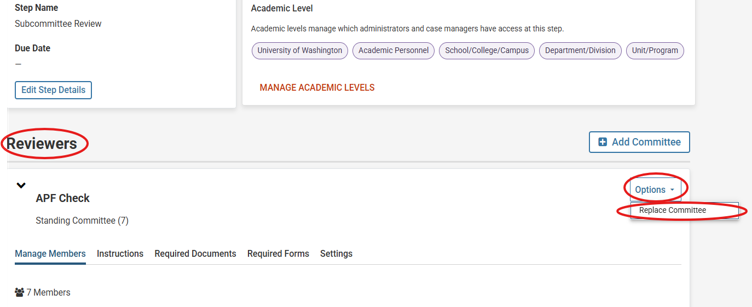
Correct: Replace Committee
Incorrect: Add Committee
Adding a committee instead of replacing it can create workflow problems and may remove instructions associated with the review step.
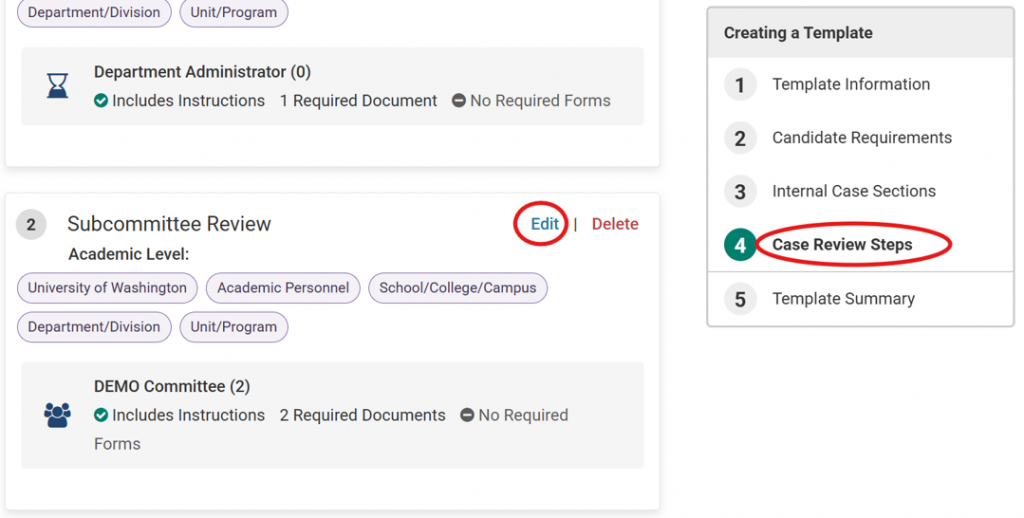
To Replace a Committee
- Open the template.
- Select Case Review Steps.
- Edit the applicable review step.
- Navigate to Reviewers.
- Select Options → Replace Committee.
- Choose an existing committee or create an ad hoc committee.
Assign a Committee Manager
Every review step containing a required document or form must have a committee manager assigned.
Best Practice: Assign one committee manager per committee.
When multiple committee managers are assigned, each manager may be required to complete required forms.
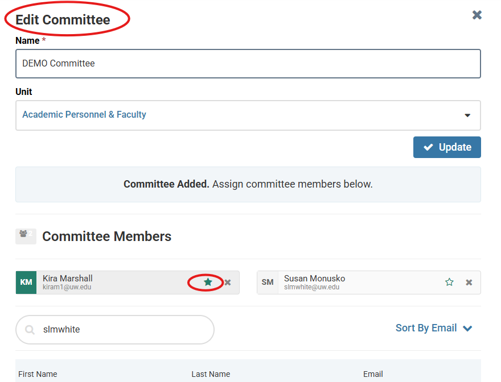
To Assign a Committee Manager
- Navigate to Users & Groups.
- Select Committees.
- Edit the committee.
- Select the star icon next to the designated manager.
- Changes are saved automatically.
Template Management: Do’s and Don’ts
Do
- Archive templates that are no longer in use.
- Add new local requirements to the bottom of existing sections.
- Review committee assignments annually.
- Download final case records before forwarding cases to APF if your unit requires a local copy.
Don’t
- Delete content from foundational templates.
- Alter APF required forms.
- Duplicate required forms.
- Reorder internal sections.
Changing the order of internal sections may affect review sequencing and result in cases being returned for correction.
Case Processing Reminders
| Activity | Timing |
|---|---|
| Case creation after initiation | Within 2 hours |
| Data sheet creation after submission | Within 2 hours |
Additional Reminders
- Data sheets must be added to the Data Sheet requirement once generated.
- Follow APF document naming conventions.
- Step instructions are located on the Case Details tab, not the Case Materials tab.
- Joint appointments require two RPT cases.
- Adjunct appointments require one case and a concurrence letter.
External Reviews & Faculty Materials
- Read and reference external review letters within recommendation documents as appropriate.
- Verify vote counts at each review level to ensure consistency.
- Request external review letters as soon as required materials are available.
- Cases do not need to be submitted before external review requests are initiated.
Updating Candidate Materials
- Administrator unlocks the candidate section.
- Candidate updates or removes materials.
- Candidate resubmits the section.
This process prevents duplicate versions of documents from appearing in the final packet.
Common Issues & Solutions
| Issue | Solution |
|---|---|
| Faculty member cannot find the Interfolio notification email | Direct them to log in to Interfolio and access the case through My Tasks. |
| PDF signatures do not display correctly | Save the document as a standard PDF before uploading. |
| Uploaded file exceeds size limits | Split materials into multiple PDFs and increase the document count requirement if needed. |
| Incorrect template was archived | Use template filters and access Archived Templates to restore it. |
| Need additional sorting and reporting options | Use the Excel-friendly download available from the Case Maintenance page. |
Important Dates
| Milestone | Date |
|---|---|
| Case Initiation Opens | January 1 |
| Case Initiation Closes | September 30 |
| Mandatory Promotions Due to APF | December 15, 2026 by 5:00 PM PST |
| Early Non-Mandatory Promotions Due | January 15, 2027 by 5:00 PM PST |
| Non-Mandatory Promotions Due | February 1, 2027 by 5:00 PM PST |
| Librarian Cases Due | April 10, 2027 by 5:00 PM PST |
Final Pre-Initiation Checklist
- ☐ Duplicate APF foundational template
- ☐ Rename template according to naming convention
- ☐ Review SCC and department requirements
- ☐ Replace all committees
- ☐ Assign one committee manager per committee
- ☐ Verify required forms and documents
- ☐ Archive outdated templates
- ☐ Test template configuration
- ☐ Communicate template availability to departments